

- AI video generators create videos from text prompts, images, or templates — no editing skills required
- Top tools in 2026 include Runway, Pictory, Synthesia, Lumen5, and InVideo
- AI video production is 60–80% faster and up to 70% cheaper than traditional editing
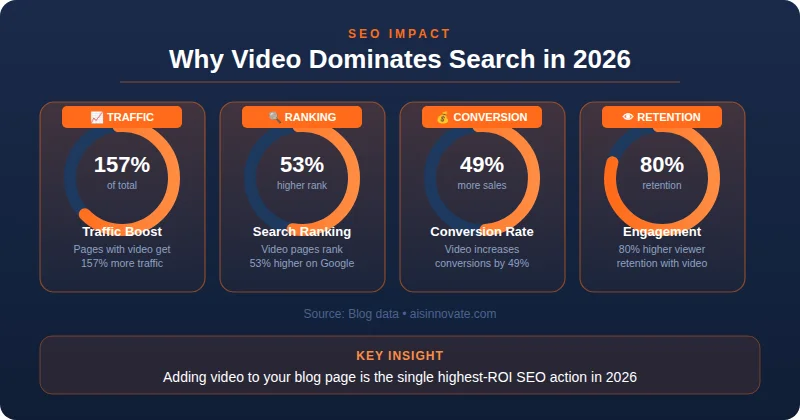
- Pages with embedded video rank 53% higher in search and see 157% more traffic
- Best free options: Canva Video AI (no watermark) and InVideo (free with watermark)
- Synthesia supports 120+ languages — best for multilingual corporate content
- Always review AI output before publishing; AI handles ~80% of work, human review ensures accuracy
- For SEO content strategies, Pictory (blog-to-video) is the top pick; Runway leads for creative/professional output
An AI video generator is an artificial intelligence tool that creates videos from text prompts, images, or templates without manual editing. These tools use machine learning to automatically generate captions, animations, voiceovers, and scenes. Top tools include Runway, Pictory, Synthesia, and Lumen5.
AI video generators save 60-80% of production time compared to traditional video editing.
- Speed: Create videos in minutes instead of hours.
- Cost: Up to 70% more cost-effective than traditional video production teams.
- Accessibility: No advanced video editing skills required.
- Quality: Produce professional-looking videos with AI-powered enhancements.
- Scalability: Generate large volumes of content quickly and efficiently.
Step-by-Step Process:
- Input Phase: Enter text prompt, upload script, or select template
- AI Analysis: Tool analyzes keywords, context, and tone
- Scene Generation: AI creates matching visuals, animations, or stock footage
- Voiceover Creation: AI generates natural-sounding narration
- Caption Addition: Auto-captions added for accessibility
- Final Polish: AI applies transitions, effects, and branding
Key Technologies Behind AI Video:
- Natural Language Processing (NLP)
- Computer Vision
- Deep Learning Models
- Text-to-Video Synthesis
1. Runway (Gen-2)
- Best for: Creative professionals, filmmakers
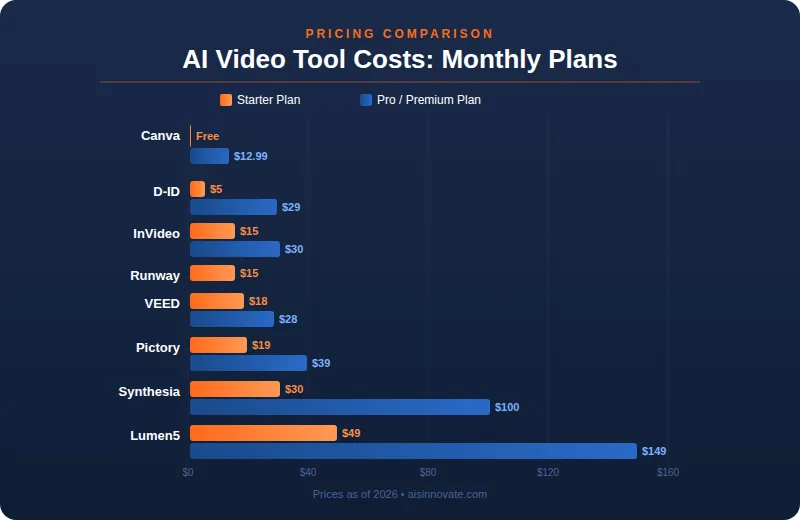
- Price: $15/month (paid), free trial available
- Key Features:
- Text-to-video generation
- Image-to-video conversion
- Video editing with AI tools
- 4K resolution output
- Pros: Hollywood-quality effects, intuitive interface
- Cons: Expensive for beginners, learning curve
2. Pictory
- Best for: Bloggers, marketers, content creators
- Price: $19/month (Starter), $39/month (Premium)
- Key Features:
- Blog-to-video conversion
- Auto-captions
- Stock library integration
- Social media optimization
- Pros: Perfect for SEO content, easy to use
- Cons: Limited customization options
3. Synthesia
- Best for: Corporate training, educational content
- Price: $30/month (Personal), $100/month (Enterprise)
- Key Features:
- AI avatar presenters
- 120+ language support
- Custom avatar creation
- Template library
- Pros: Professional avatars, multi-language
- Cons: High cost, less creative flexibility
4. Lumen5
- Best for: Social media, business content
- Price: $49/month (Starter), $149/month (Business)
- Key Features:
- Text-to-video automation
- Brand customization
- Media library
- Analytics tracking
- Pros: Great for LinkedIn, branded templates
- Cons: Limited video length options
5. InVideo
- Best for: Beginners, small businesses
- Price: $15/month (Basic), $30/month (Plus)
- Key Features:
- 5,000+ templates
- AI text-to-video
- Voiceover generator
- Export without watermark (paid)
- Pros: Affordable, beginner-friendly
- Cons: Watermark on free version
6. D-ID
- Best for: Presentations, talking head videos
- Price: $5/month (Basic), $29/month (Pro)
- Key Features:
- AI avatar animation
- Photo-to-video
- Lip-sync technology
- API access
- Pros: Unique avatar feature, cheap
- Cons: Limited video styles
7. VEED
- Best for: Podcasters, interview content
- Price: $18/month (Basic), $28/month (Pro)
- Key Features:
- Auto-subtitles
- Virtual studio
- AI avatar
- Video trimming
- Pros: Great for podcasts, clean interface
- Cons: Fewer templates
8. Wavve
- Best for: Social media snippets
- Price: $15/month (Basic), $29/month (Plus)
- Key Features:
- Audio-to-video conversion
- Social templates
- Animated text
- Brand kit
- Pros: Perfect for Instagram, TikTok
- Cons: Limited video length
9. Fliki
- Best for: Short-form content, storytelling
- Price: $21/month (Standard), $42/month (Pro)
- Key Features:
- Text-to-video
- AI voiceovers
- Scene library
- Mobile app
- Pros: Great for YouTube Shorts, mobile-friendly
- Cons: Limited resolution on lower plans
10. Canva Video AI
- Best for: Beginners, simple edits
- Price: Free (basic), $12.99/month (Pro)
- Key Features:
- Magic design for video
- AI text-to-video
- Template library
- Brand kit
- Pros: Free option, integrates with Canva
- Cons: Basic features only
Ask Yourself These Questions:
What's my budget?
- Under $20: InVideo, Fliki
- $20-50: Pictory, VEED
- $50+: Lumen5, Synthesia
What type of content?
- Blog-to-video: Pictory
- Training videos: Synthesia
- Social media: InVideo, Wavve
- Creative films: Runway
Do I need avatars?
- Yes: Synthesia, D-ID
- No: Pictory, Runway
What's my skill level?
- Beginner: InVideo, Canva
- Intermediate: Pictory, VEED
- Advanced: Runway, Lumen5
✅ Dos:
- Use clear, specific prompts
- Add brand colors and logos
- Include captions for accessibility
- Test multiple versions
- Optimize for platform (YouTube vs Instagram vs LinkedIn)
- Keep videos under 3 minutes for engagement
❌ Don'ts:
- Don't use generic prompts
- Don't skip reviewing AI output
- Don't ignore copyright (stock footage)
- Don't overuse animations
- Don't forget audio quality
Why SEO Marketers Need AI Video:
Benefit | Stats |
Traffic Increase | Videos boost page traffic by 157% |
Engagement | 80% higher retention with video |
Conversion | Video increases conversion by 49% |
Search Ranking | Pages with video rank 53% higher |
- Keyword in Title: Include target keyword naturally
- Custom Thumbnails: Eye-catching, branded
- Description: 200+ words with keywords
- Tags: 5-10 relevant tags
- Captions: Add text for accessibility + SEO
- Embed on Blog: Increase dwell time
1. Generic Prompts
- ❌ "Make a video about dogs"
- ✅ "Create 60-second video about golden retriever training tips for beginners with upbeat music"
2. Ignoring Audio Quality
- Bad voiceovers = viewers leave. Use AI tools with natural voice options.
3. No Branding
- Add your logo, colors, and font consistently.
4. Overusing Effects
- Too many animations = distracting. Keep it simple.
5. Skipping Review
- AI makes mistakes. Always watch before publishing.
Before You Start:
- Choose your target audience
- Define video goal (educate, promote, entertain)
- Select 1-2 AI tools to test
- Prepare script or prompt
Creating:
- Write specific, detailed prompt
- Generate 2-3 versions
- Review and edit AI output
- Add branding (logo, colors)
- Include captions
After Creating:
- Optimize title with keywords
- Write 200+ word description
- Add relevant tags
- Create custom thumbnail
- Embed on blog/website
- Share on social media
- Track performance metrics
Week 1: Test 2 Free Tools
- Try Canva Video AI (free)
- Try InVideo (free with watermark)
- Create 1-2 test videos
Week 2: Choose Paid Tool
- Compare features
- Select 1 tool based on needs
- Subscribe to paid plan
Week 3: Create Your First Professional Video
- Write detailed script
- Generate video
- Review and edit
- Publish on YouTube/blog
Week 4: Scale Content
- Create 3-5 videos/month
- Optimize for SEO
- Track analytics
- Improve based on data